<?xml version="1.0" encoding="utf-8"?><feed xmlns="http://www.w3.org/2005/Atom" ><generator uri="https://jekyllrb.com/" version="3.10.0">Jekyll</generator><link href="https://www.samknight.co.uk/feed.xml" rel="self" type="application/atom+xml" /><link href="https://www.samknight.co.uk/" rel="alternate" type="text/html" /><updated>2025-03-02T19:14:18+00:00</updated><id>https://www.samknight.co.uk/feed.xml</id><title type="html">Sam Knight</title><subtitle>People focussed technical leader</subtitle><entry><title type="html">Omnifocus Plugin Duplicate for list</title><link href="https://www.samknight.co.uk/2021/04/17/omnifocus-plugin-duplicate-for-list" rel="alternate" type="text/html" title="Omnifocus Plugin Duplicate for list" /><published>2021-04-17T00:00:00+00:00</published><updated>2021-04-17T00:00:00+00:00</updated><id>https://www.samknight.co.uk/2021/04/17/omnifocus-plugin-duplicate-for-list</id><content type="html" xml:base="https://www.samknight.co.uk/2021/04/17/omnifocus-plugin-duplicate-for-list"><![CDATA[<p>I’ve just released a plugin for Omnifocus called <a href="https://github.com/samknight/omnifocus-automation-scripts">Duplicate for List</a>. This plugins allows you to duplicate any task and replace a placeholder with values from a list.</p>

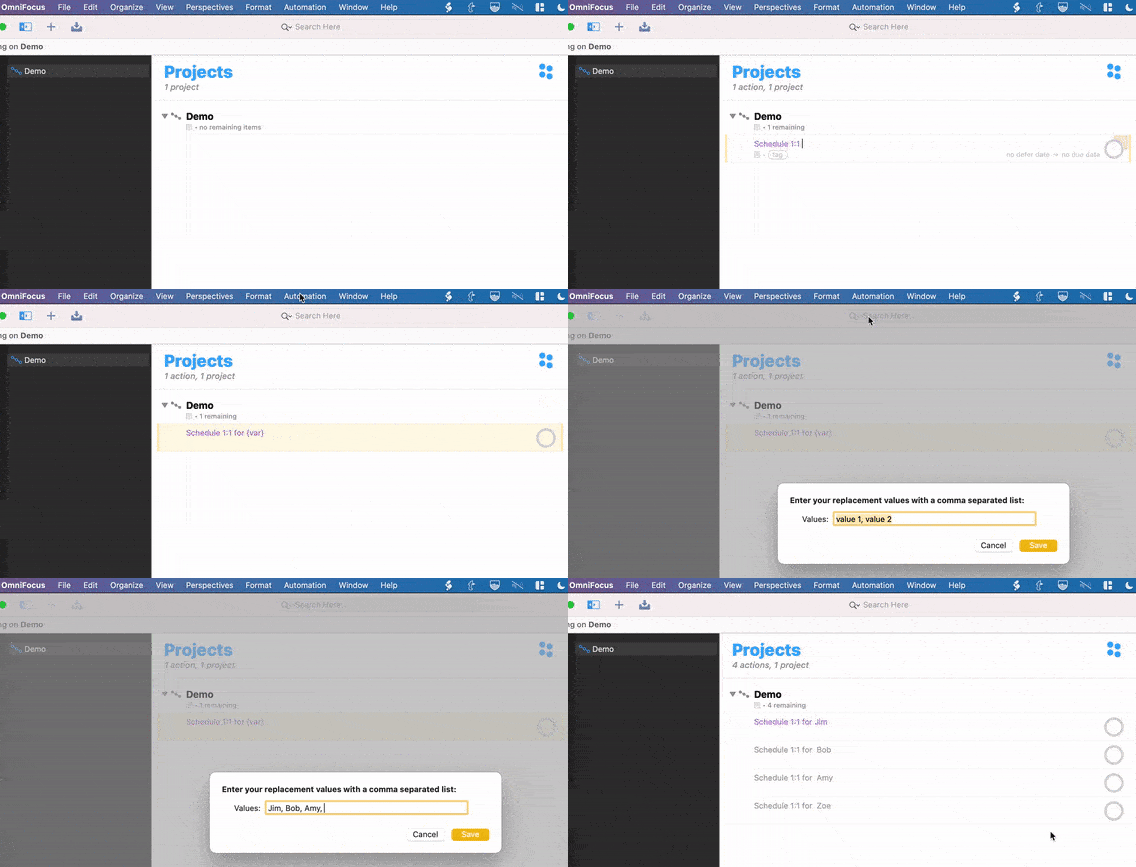
<p>I’m currently managing 8 developers which has increased the number of times I need to completed certain actions. Whether its completing 1:1s or ensuring I’ve communicated key information; I found myself re-typing the same task into Omnifocus many times, only slightly editing to add the name of the team member.</p>

<p><img src="/assets/duplicate-for-list-demo.gif" alt="Demo of the duplicate for list plugin in use" /></p>

<p>The list entered during the first run will be remembered for all future runs. It can be reset by running the plugin whilst holding down the option key. This also works for nested tasks, just highlight the all the tasks to be duplicated.</p>

<p>Share and enjoy</p>]]></content><author><name></name></author><category term="writings" /><summary type="html"><![CDATA[I’ve just released a plugin for Omnifocus called Duplicate for List. This plugins allows you to duplicate any task and replace a placeholder with values from a list.]]></summary></entry><entry><title type="html">Product Thinking in Practice webinar</title><link href="https://www.samknight.co.uk/2020/08/05/product-thinking-in-practice-webinar" rel="alternate" type="text/html" title="Product Thinking in Practice webinar" /><published>2020-08-05T00:00:00+00:00</published><updated>2020-08-05T00:00:00+00:00</updated><id>https://www.samknight.co.uk/2020/08/05/product-thinking-in-practice-webinar</id><content type="html" xml:base="https://www.samknight.co.uk/2020/08/05/product-thinking-in-practice-webinar"><![CDATA[<p>Last month I hosted a webinar with my Box UK colleague Kevin Greer on Product Thinking for Wales Tech Week. It’s a helpful introduction to some different ways of thinking about development and how we’ve put some of that into practice.</p>

<p>Some of the topics include:</p>

<ul>
  <li>What is Product Thinking?</li>
  <li>Creating an effective Product Vision</li>
  <li>MVP vs Smallest Successful Release</li>
  <li>How to avoid becoming a feature factory</li>
  <li>Why it’s important to never stop learning</li>
</ul>

<p><a href="https://vimeo.com/439966290">Watch the webinar</a></p>]]></content><author><name></name></author><category term="writings" /><category term="musings" /><summary type="html"><![CDATA[Last month I hosted a webinar with my Box UK colleague Kevin Greer on Product Thinking for Wales Tech Week. It’s a helpful introduction to some different ways of thinking about development and how we’ve put some of that into practice.]]></summary></entry><entry><title type="html">What makes a real deadline</title><link href="https://www.samknight.co.uk/2020/07/28/what-makes-a-real-deadline" rel="alternate" type="text/html" title="What makes a real deadline" /><published>2020-07-28T00:00:00+00:00</published><updated>2020-07-28T00:00:00+00:00</updated><id>https://www.samknight.co.uk/2020/07/28/what-makes-a-real-deadline</id><content type="html" xml:base="https://www.samknight.co.uk/2020/07/28/what-makes-a-real-deadline"><![CDATA[<p>We are all working to deadlines, all the time. Whether you’re working to a daily print deadline or a project deadline further in the future, everbody is ruled by the deadline. Too often we don’t get to choose our deadlines, they get imposed upon us. Our workload is also something we can’t always control. This means we are often looking at calendars knowing that work left to do is impossible to be delivered by the deadline.</p>

<p>Understanding your deadlines is key to organising your work.</p>

<h2 id="dont-make-up-deadlines">Don’t make up deadlines</h2>

<p>David Allen in his Getting Things Done book says don’t add a task with a due date if it’s not a “real” deadline.</p>

<blockquote>
  <p>Resist this impulse. You need to trust your calendar as sacred territory, reflecting the exact hard edges commitments.</p>
</blockquote>

<p>In a professional environment work often comes with an expected deadline. If we don’t have control over our assigned work then unexpected work can put old deadlines in jeopardy. At this point, some deadlines will have to be moved. But if the deadline can be moved, was it ever really a deadline?</p>

<p>This suggests that there is more than one type of deadline.</p>

<h2 id="motivational-deadlines">Motivational deadlines</h2>

<p>David Motto helpfully suggested a method of using deadlines to improve motivation. He outlined <a href="https://davidmotto.com/three-types-of-deadlines/">3 levels of deadline</a> for musicians to encourage practice and preparation.</p>

<ul>
  <li>Type 1: Outside of your control and accountable to others e.g. an audition or performance with a paying audience</li>
  <li>Type 2: Inside your control and accountable to others e.g. setting a date for a rehearsal performance with family and friends</li>
  <li>Type 3: Inside your control and accountable to yourself e.g. perform a mock concert with no audience</li>
</ul>

<p>His definition works well in this context of motivation. However, it didn’t help to distinguish between external deadlines that can be moved.</p>

<p>Type 3 is clearly not the type of “real” deadline we are looking for. The article suggests that this is the hardest deadline to meet and requires a lot of motivation. I could simply choose to do my mock concert with no audience a day or two later.</p>

<p>Type 2 looks like a real deadline… but who are you performing to and how accountable will they make you? If I was performing to friends and family, any mistakes would certainly be forgiven, especially as it wasn’t the “real” event. In software development you can demo work to others but if it’s not quite right, is there enough accountability to not gloss over imperfections? The criteria for a successful demo is that it looks good, it does not necessarily have to BE good. This potential loophole in meeting a deadline doesn’t feel like it’s “real”. This suggests that the event has to be “real” as well as the date.</p>

<p>Type 1 in this context fits my idea of a “real” deadline. There’s a performance and that can’t be moved. In the world of software though we see many deadlines often linked to arbitrary events e.g. the end of a company’s financial year. Those deadlines can and do get moved because it’s better to improve or finish the work than it is to reach that exact deadline. This is only often discussed with any real meaning very close to the original deadline.</p>

<h2 id="prioritising-deadlines">Prioritising deadlines</h2>

<p>When you’re overwhelmed with deadlines you need to know which ones are “real”. I found myself in this position a few years ago. Commitments had been made and were only communicated with the team when time was running out.</p>

<p>We put all the tasks on a board and tried to set a priority order. We started by ordering them by date but discovered that the competing deadlines were impossible to meet. We started to question the reason for the work and quickly realised that not all the deadlines were “real”! Some were arbitrary, some were important and others had contractual implications.</p>

<p>We started to form our own version of the 3 deadlines:</p>

<ul>
  <li>Real deadline: Chosen because it was contractual or facilitated other commitments</li>
  <li>Expected deadline: Chosen because it made scheduling resources simpler</li>
  <li>Target deadline: Chosen because it allowed new work to be added or for the internal sales team to demo</li>
</ul>

<p>This allowed us to prioritise which deadlines were more important. As we went through the backlog it got harder for the work to fit neatly into 3 types. We needed to understand what we meant by deadlines even more.</p>

<h2 id="accountability">Accountability</h2>

<p>Whereas David Motto’s deadlines focussed around accountability, our deadline’s centred on flexibility. We had found the concept that helped determine the “real”-ness of a deadline - the ability for it to move. This by itself though didn’t help to categorise our deadlines.</p>

<p>Earlier we discussed how an event had to be “real” and that a concert for friends and family could be too forgiving to be taken seriously. Imagine instead, the example of a grand performance. The venue that had been booked and paid for, a long marketing campaign may have been run, many shift staff who were relying on the work and hundreds of ticket buyers who had paid for baby-sitters. The inconvenience of missing this deadline is much greater and the public would be far less forgiving. There are severe consequences to missing that deadline.</p>

<p>This gives us a second lens in which to view deadlines. Flexibility and consequences.</p>

<h2 id="consequential-deadlines">Consequential deadlines</h2>

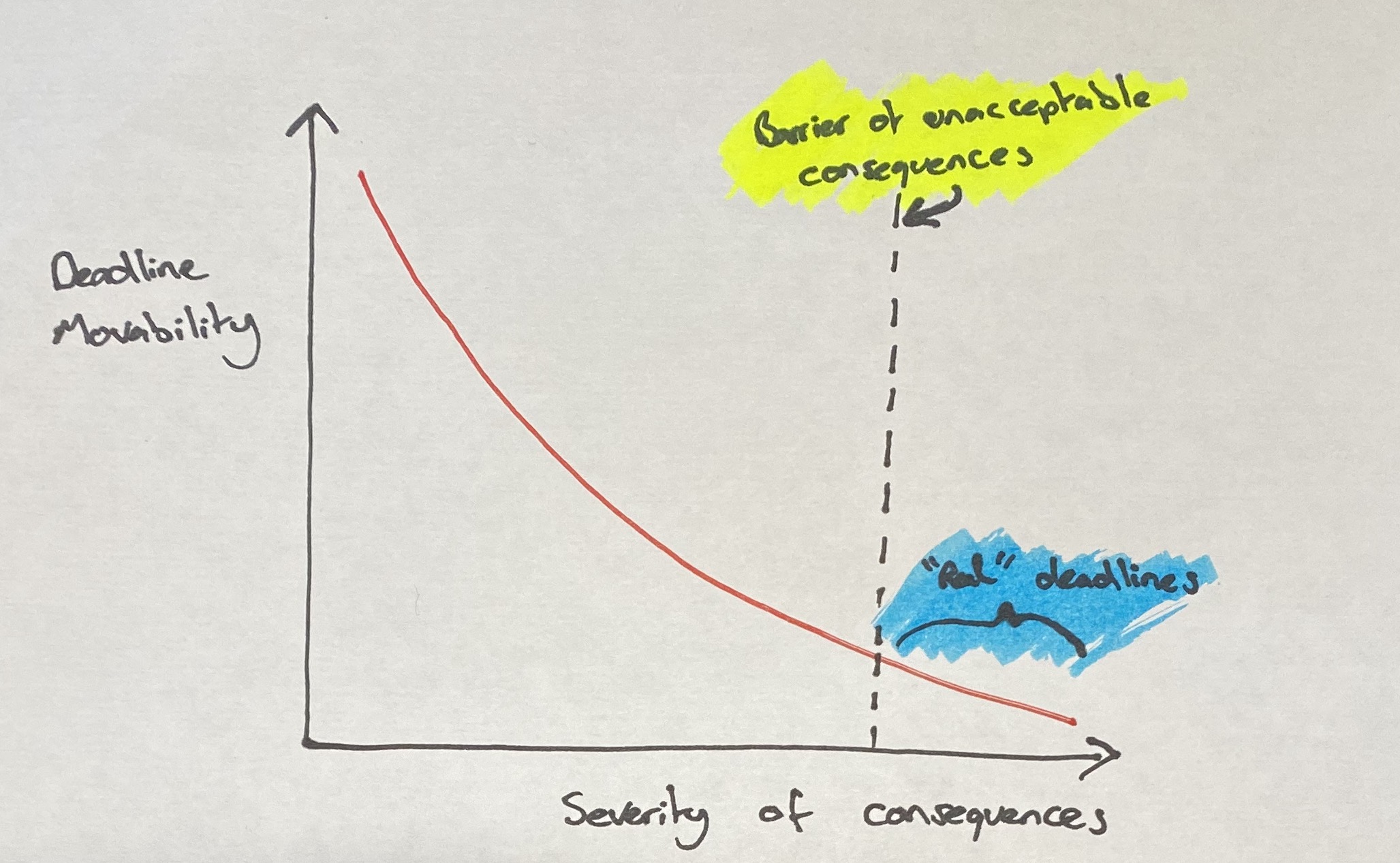
<p>If flexibility defines the type of deadline we are looking at, then consequences helps us to define that flexibility. As shown in the graph below they are inversly linked.</p>

<p><img src="/assets/graph_of_deadlines.jpg" alt="A new Automator application interface" /></p>

<p>This means we can establish the 1st law of deadlines:</p>

<blockquote>
  <p><strong>The more severe the consequences, the more fixed the deadline will be.</strong></p>
</blockquote>

<p>This law makes it trickier to define the moment when a deadline becomes real. The graph shows a line which marks the point where a deadline becomes real. There is no formula for how to decide where this line should be but I have established a helpful maxim:</p>

<blockquote>
  <p><strong>A real deadline is one where the consequences are too great to be missed.</strong></p>
</blockquote>

<hr />
<p>Other thoughts I’ve had during writing this which I may write about further if there is interest:</p>
<ul>
  <li>How to set deadlines for “real” events that aren’t scheduled e.g. disaster planning</li>
  <li>Mapping whether a deadline’s consequence rises or falls over times</li>
</ul>]]></content><author><name></name></author><category term="writings" /><summary type="html"><![CDATA[We are all working to deadlines, all the time. Whether you’re working to a daily print deadline or a project deadline further in the future, everbody is ruled by the deadline. Too often we don’t get to choose our deadlines, they get imposed upon us. Our workload is also something we can’t always control. This means we are often looking at calendars knowing that work left to do is impossible to be delivered by the deadline.]]></summary></entry><entry><title type="html">Automating Slack with AppleScript</title><link href="https://www.samknight.co.uk/2018/12/13/automating-slack-with-applescript" rel="alternate" type="text/html" title="Automating Slack with AppleScript" /><published>2018-12-13T00:00:00+00:00</published><updated>2018-12-13T00:00:00+00:00</updated><id>https://www.samknight.co.uk/2018/12/13/automating-slack-with-applescript</id><content type="html" xml:base="https://www.samknight.co.uk/2018/12/13/automating-slack-with-applescript"><![CDATA[<p>I recently published an <a href="https://github.com/samknight/slack_applescript">AppleScript library</a> to help automate common tasks I do in Slack.</p>

<p>For those familiar with AppleScript, the instructions on the library should suffice but for those keen to get started with AppleScript for the first time I’ve created a quick guide for how to launch these Slack automations.</p>

<p>In this tutorial we’ll learn how to set your status to lunch via Spotlight.</p>

<p><strong>Installation of the Library</strong></p>

<p>Follow the instructions <a href="https://github.com/samknight/slack_applescript">on my GitHub repository</a></p>

<p><strong>Testing scripts with Script Editor</strong></p>

<p>Open up <code class="language-plaintext highlighter-rouge">Applications -&gt; Utilities -&gt;  Script Editor</code></p>

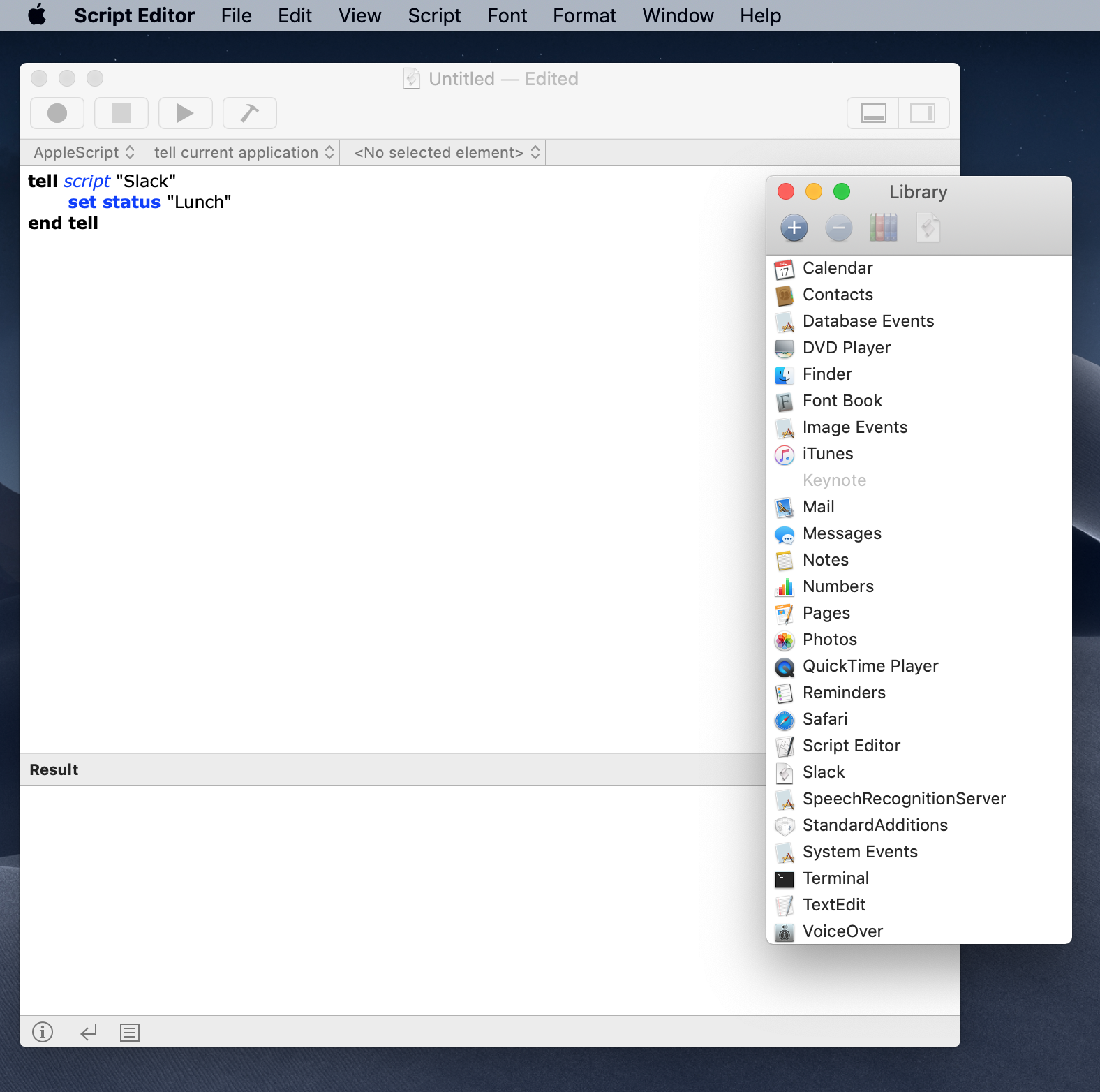
<p>Here you will have a blank sheet. This will act as scratch pad for you to try some scripts. Look at some of the suggestions <a href="https://github.com/samknight/slack_applescript">on my GitHub repository</a> for inspiration.</p>

<p>Once you’ve written your script, press the play button to test it.
<img src="/assets/script_editor.png" alt="Script editor example code" /></p>

<p><strong>Executing scripts</strong></p>

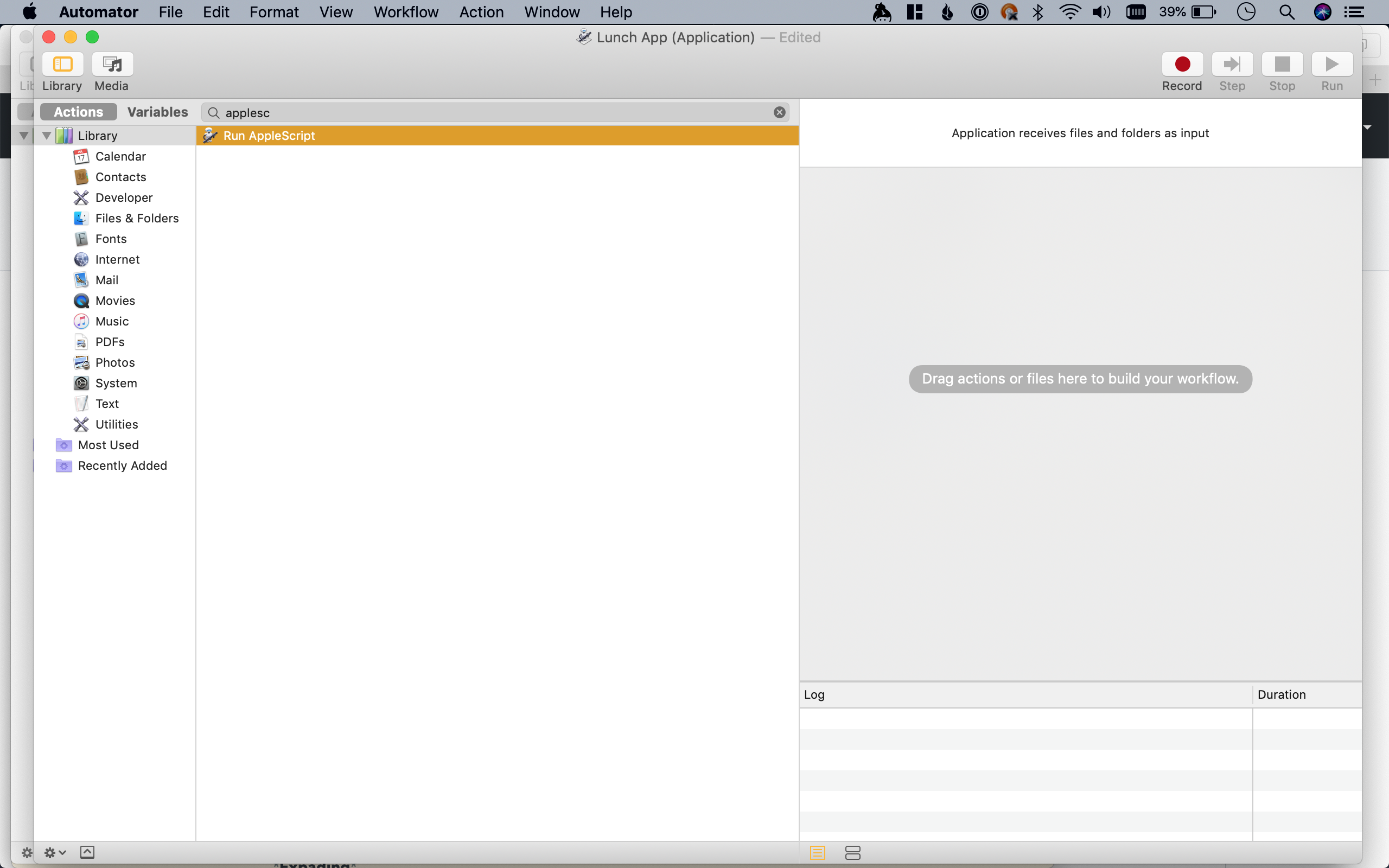
<p>Now that we can run some code, we need a more easily accessible way of running the script. This is where Automator comes in. Automator is a program that helps to chain together various actions on your computer including AppleScripts.</p>

<ol>
  <li>Open up <code class="language-plaintext highlighter-rouge">Applications -&gt; Utilities -&gt; Automator</code></li>
  <li>Create a new Application</li>
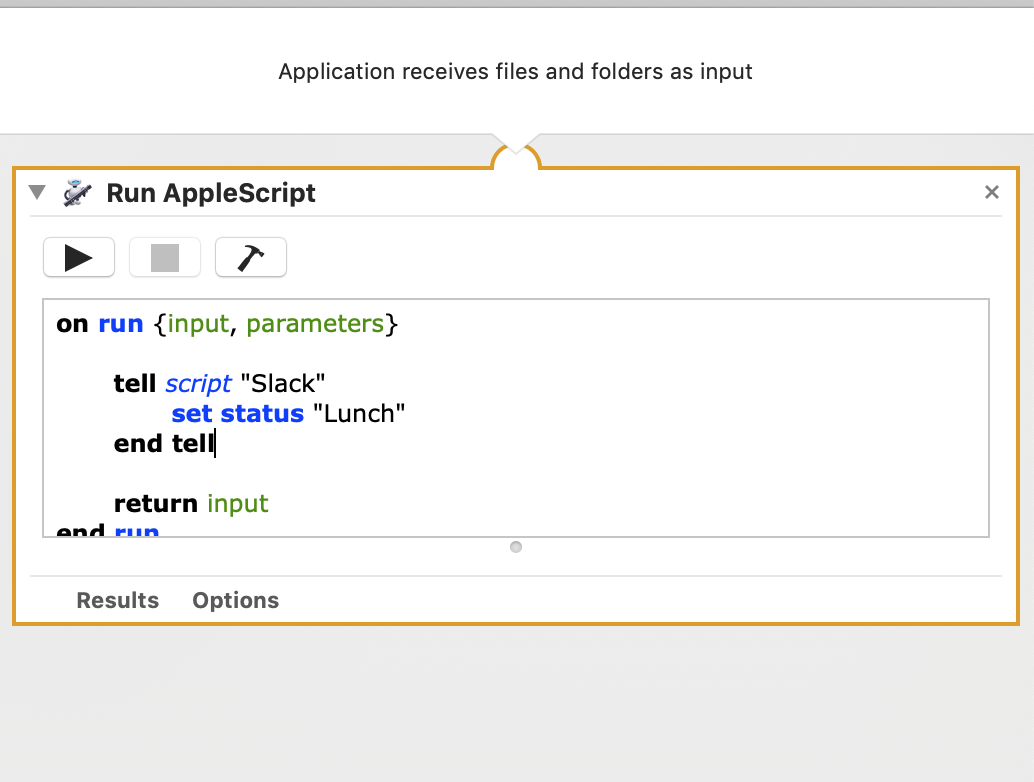
  <li>Search for <code class="language-plaintext highlighter-rouge">Run AppleScript</code> on the actions bar and drag into workflow area on the right.</li>
  <li>Replace <code class="language-plaintext highlighter-rouge">(* Your script goes here *)</code> with the script you made in Script Editor</li>
  <li>Save the file as the application name of your choice e.g. <code class="language-plaintext highlighter-rouge">Slack Lunch Status</code></li>
</ol>

<p><img src="/assets/blank_automator_app.png" alt="A new Automator application interface" />
<img src="/assets/applescript_automator_app.png" alt="An Automator app running AppleScript" /></p>

<p>Go to the folder where you saved the application and double click. The first time should fail as it won’t have permission to access keyboard functions.</p>

<p>Go to <code class="language-plaintext highlighter-rouge">System Preferences -&gt; Security &amp; Privacy -&gt; Privacy -&gt; Accessibility</code> and check the box next to the app you saved. You may need to unlock the padlock to do this.</p>

<p>Click the application again and it will now run.</p>

<p><strong>Trigger via Spotlight</strong></p>

<p>Whilst clicking an app in Finder is better than running scripts in the script editor there is an even better way to trigger these scripts.</p>

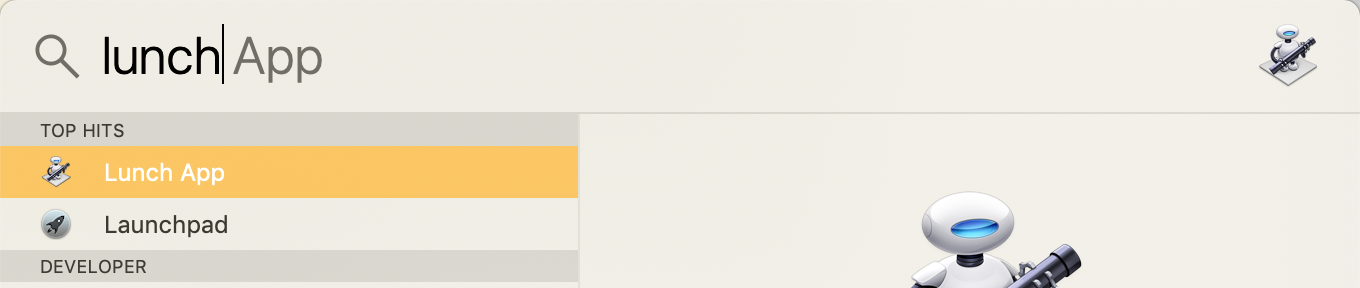
<p>Launch Spotlight with <code class="language-plaintext highlighter-rouge">cmd + space</code> and start to type the name of your app. Once it appears press <code class="language-plaintext highlighter-rouge">enter</code> and it will now run.</p>

<p><img src="/assets/spotlight_search.png" alt="Finding your app via spotlight" /></p>

<p>Voila - you’re on your way to automating your uses with Slack</p>

<p><strong>Alfred</strong></p>

<p>If you like triggering things with spotlight then you’ll love <a href="https://www.alfredapp.com">Alfred - Productivity App for macOS</a>. With the power pack add on you can create your own AppleScript workflows directly in Alfred triggered by a keyword. This is a much quicker and more maintainable method than creating Automator applications each time.</p>

<p>I am by no means an expert on Automator so there may be much more effective ways of creating the above. If you know of a simpler way without tools such as Alfred (see also Keyboard Maestro) then please let me know and I will update this post.</p>

<p><strong>Extra Credit</strong></p>

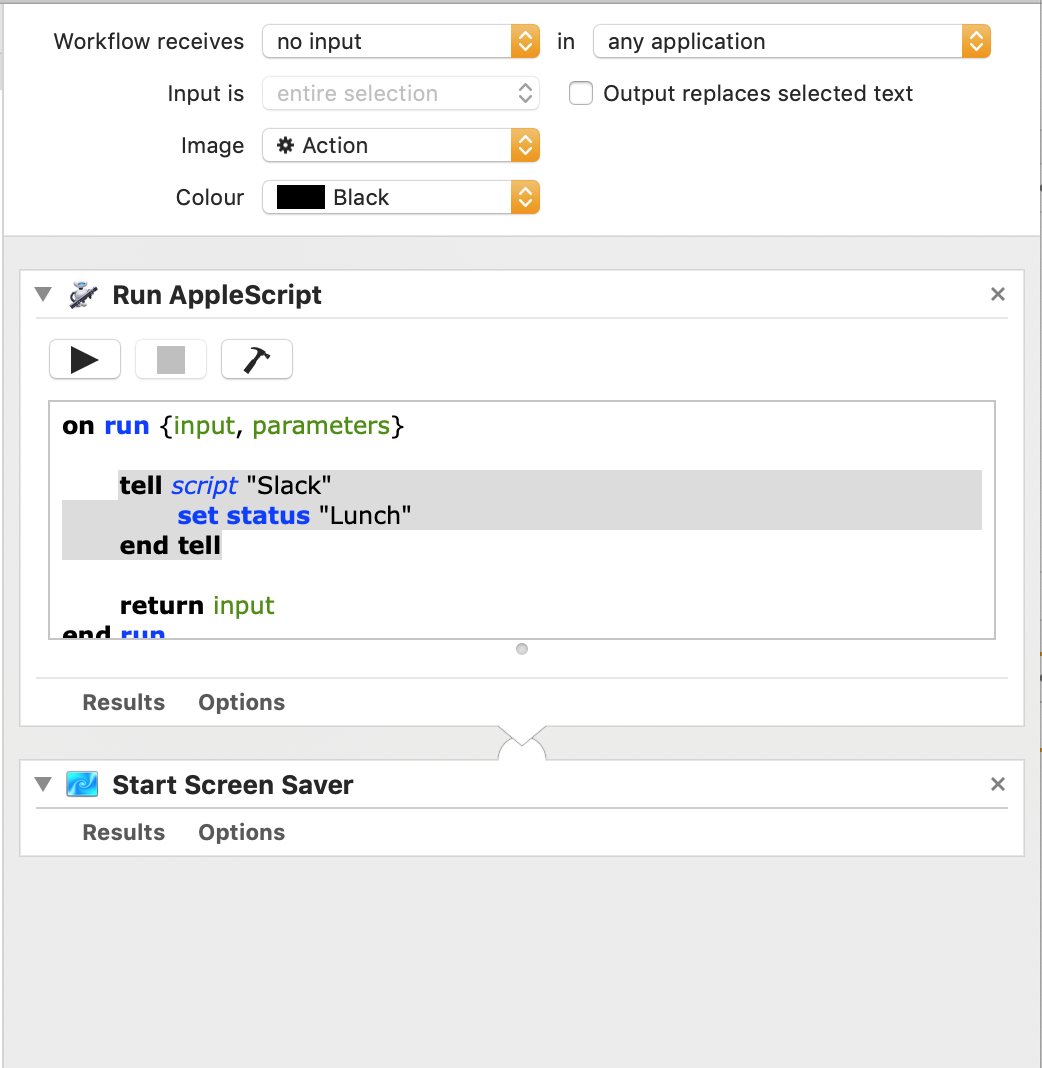
<p>You don’t have to stop at one action per Automator application. You can chain events to create some complex workflows. Just look at the library on the left for hundreds of actions you can add. You can even add custom scripts in javascript and more. See an example below.</p>

<p><img src="/assets/bonus_automator_app.png" alt="Automator app with 2 actions" /></p>

<p>That’s all!</p>]]></content><author><name></name></author><category term="writings" /><summary type="html"><![CDATA[I recently published an AppleScript library to help automate common tasks I do in Slack.]]></summary></entry></feed>